Shmup Devlog #3
Collisions
Table of Contents
Collisions
Up to now I had collision detection implemented the brute-force way, meaning that essentially every object in the game was checked against every other object. I thought the number of objects would be small enough that this would be fine for the initial prototype. However, the number of objects might not be so small after all, so I thought about making collision detection more efficient by using a spatial hash map. And I wondered, how these two approaches compare in terms of performance. Let’s run a quick benchmark.
Note
You can find the full source code of the benchmark on GitHub .
Prerequisites
For simplicity’s sake, we’re looking at collisions between axis aligned bounding boxes (AABB ) of objects in a 2D space only. Also, every game object has the same size and hence the same bounding box. Furthermore, every game object can collide with every other game object, we’re excluding things like collision layers, hitboxes and hurtboxes, and things like that. Let’s now look at the two ways of implementing collision detection we’re going to compare in our little benchmark.
The Brute-Force Way
Let’s say we have objects in a scene and we want to know which objects collide with each other. To do this the naive way, we check every object against every other object. This means that we need to perform comparisons, which is in terms of time complexity. This means quadratic growth in run time.
public class CollisionDetector
{
    public void DetectCollisions()
    {
        var gameObjects = [ ... ];

        for (var i = 0; i < gameObjects.Count; i++) {
            var a = gameObjects[i];
            for (var j = i + 1; j < gameObjects.Count; j++) {
                var b = gameObjects[j];

                // Check for collision between a and b
            }
        }
    }
}
The Spatial Hash Map Way
In order to reduce the number of comparisons, we will use a simple spatial partitioning technique that uses a uniform grid . This means, we divide the 2D space into a grid of equally sized cells. Each cell is then assigned the objects that overlap that cell. We then only need to check the objects in the same cells as the object we are checking against.
A uniform grid with some game objects indicated by their red-colored AABBs
Then, instead of storing an actual grid of objects, we will use a hash table to store the objects using the cell coordinates as the key, and a list of objects that overlap that cell as the value.
For brevity, we’ll omit the implementation of the spatial partitioning grid here. For now, let’s assume we have it
available via a variable called grid, and that is has a method GetCells() which returns a collection of all its
cells, each consisting of a list of objects that overlap that cell. We can then iterate over the cells and check the
objects in each cell against each other. That’s similar to the brute-force approach, but we’re narrowing down the number
of objects we need to check by looking at only the objects in the same cell.
The collision detection code from earlier would then look something like this:
public class CollisionDetector
{
    public void DetectCollisions()
    {
        var cells = spatialHashGrid.GetCells();

        foreach (var gameObjects in cells) {
            for (var j = 0; j < gameObjects.Count; j++) {
                var a = gameObjects[j];
                for (var k = j + 1; k < gameObjects.Count; k++) {
                    var b = gameObjects[k];

                    // If not checked yet, check for collision between a and b
                }
            }
        }
    }
}
Now let’s look at some numbers.
Benchmarking
Let’s run a benchmark to compare the spatial partitioning approach to the brute-force method. We’ll randomly place various numbers of objects in 2D space. The parameters are:
- 640x360 pixels of 2D space (that’s the design resolution of the game)
- 32x32 pixels object axis aligned bounding boxes
- 64x64 pixels grid size
- Two benchmarks, brute-force vs. spatial hash grid:
- 10 to 100 objects, in steps of 10
- 100 to 1000 objects, in steps of 100
The benchmarks are done using BenchmarkDotNet .
Here are the results, graphs are created using https://chartbenchmark.net/ :
BenchmarkDotNet v0.15.8, Windows 11 (10.0.26100.6899/24H2/2024Update/HudsonValley)
12th Gen Intel Core i7-12700H 2.70GHz, 1 CPU, 20 logical and 14 physical cores
.NET SDK 10.0.103
  [Host]     : .NET 10.0.3 (10.0.3, 10.0.326.7603), X64 RyuJIT x86-64-v3
  Job-ZSBTUS : .NET 10.0.3 (10.0.3, 10.0.326.7603), X64 RyuJIT x86-64-v3
Object Count from 10 to 100:
| Method | Object Count | Mean | Error | Std Dev |
|---|---|---|---|---|
| ‘Brute Force’ | 10 | 412.0 ns | 1.69 ns | 1.58 ns |
| ‘Spatial Hash’ | 10 | 301.0 ns | 0.56 ns | 0.50 ns |
| ‘Brute Force’ | 20 | 1,280.2 ns | 7.76 ns | 6.87 ns |
| ‘Spatial Hash’ | 20 | 712.8 ns | 2.33 ns | 2.07 ns |
| ‘Brute Force’ | 30 | 2,542.2 ns | 7.13 ns | 6.67 ns |
| ‘Spatial Hash’ | 30 | 1,171.0 ns | 6.07 ns | 4.74 ns |
| ‘Brute Force’ | 40 | 4,223.2 ns | 17.77 ns | 16.62 ns |
| ‘Spatial Hash’ | 40 | 1,669.5 ns | 14.82 ns | 13.86 ns |
| ‘Brute Force’ | 50 | 6,280.6 ns | 40.63 ns | 38.00 ns |
| ‘Spatial Hash’ | 50 | 2,214.4 ns | 13.24 ns | 12.39 ns |
| ‘Brute Force’ | 60 | 8,725.4 ns | 44.31 ns | 41.45 ns |
| ‘Spatial Hash’ | 60 | 2,865.4 ns | 20.96 ns | 18.58 ns |
| ‘Brute Force’ | 70 | 11,605.5 ns | 117.24 ns | 109.67 ns |
| ‘Spatial Hash’ | 70 | 3,575.1 ns | 8.66 ns | 7.68 ns |
| ‘Brute Force’ | 80 | 14,580.3 ns | 31.25 ns | 29.23 ns |
| ‘Spatial Hash’ | 80 | 4,344.4 ns | 17.80 ns | 15.78 ns |
| ‘Brute Force’ | 90 | 18,122.7 ns | 42.93 ns | 40.15 ns |
| ‘Spatial Hash’ | 90 | 5,241.1 ns | 28.21 ns | 26.39 ns |
| ‘Brute Force’ | 100 | 22,102.9 ns | 76.83 ns | 71.87 ns |
| ‘Spatial Hash’ | 100 | 5,765.8 ns | 28.37 ns | 25.15 ns |
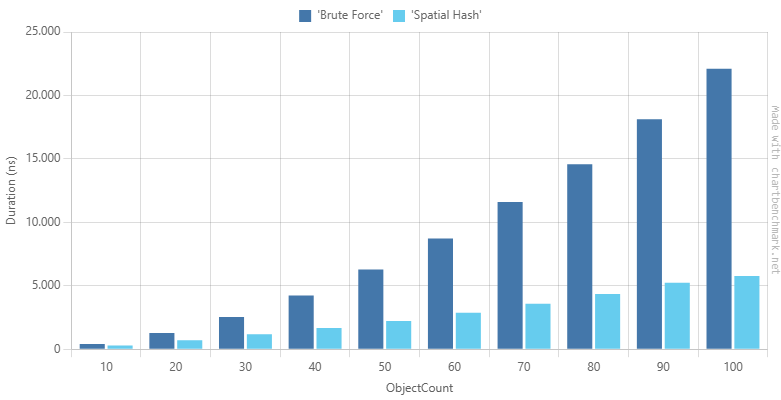
Brute Force vs Spatial Hash Grid Duration, 10 to 100 Objects
As expected, the brute-force approach is growing much faster than the spatial hash approach. Increasing the number of objects from 10 to 100 (a 10x increase) costs roughly 54x more time (412 ns to 22,103 ns). In contrast, the spatial hash approach grows much more slowly: the same 10x increase in objects only costs about 19x more time (301 ns to 5,766 ns). At n=10 the spatial hash is 1.4x faster, by n=100 it’s already 3.8x faster.
Now, let’s tighten the screws and increase the object count.
Object Count from 100 to 1000:
| Method | Object Count | Mean | Error | Std Dev |
|---|---|---|---|---|
| ‘Brute Force’ | 100 | 22.366 us | 0.0523 us | 0.0463 us |
| ‘Spatial Hash’ | 100 | 5.689 us | 0.0243 us | 0.0215 us |
| ‘Brute Force’ | 200 | 81.588 us | 0.3415 us | 0.3027 us |
| ‘Spatial Hash’ | 200 | 18.732 us | 0.0579 us | 0.0484 us |
| ‘Brute Force’ | 300 | 179.117 us | 0.5575 us | 0.4942 us |
| ‘Spatial Hash’ | 300 | 44.896 us | 0.5860 us | 0.5481 us |
| ‘Brute Force’ | 400 | 309.608 us | 0.5617 us | 0.4979 us |
| ‘Spatial Hash’ | 400 | 68.248 us | 0.3117 us | 0.2916 us |
| ‘Brute Force’ | 500 | 469.737 us | 0.6178 us | 0.5159 us |
| ‘Spatial Hash’ | 500 | 118.365 us | 0.3170 us | 0.2966 us |
| ‘Brute Force’ | 600 | 682.300 us | 1.9441 us | 1.7234 us |
| ‘Spatial Hash’ | 600 | 143.733 us | 0.6471 us | 0.6053 us |
| ‘Brute Force’ | 700 | 914.185 us | 3.2993 us | 2.9247 us |
| ‘Spatial Hash’ | 700 | 208.231 us | 0.5437 us | 0.5085 us |
| ‘Brute Force’ | 800 | 1,186.063 us | 4.5536 us | 3.8024 us |
| ‘Spatial Hash’ | 800 | 294.344 us | 1.1251 us | 1.0524 us |
| ‘Brute Force’ | 900 | 1,525.599 us | 9.7191 us | 7.5880 us |
| ‘Spatial Hash’ | 900 | 308.287 us | 1.4430 us | 1.2792 us |
| ‘Brute Force’ | 1000 | 1,880.231 us | 18.4161 us | 16.3254 us |
| ‘Spatial Hash’ | 1000 | 394.605 us | 1.2528 us | 1.1718 us |
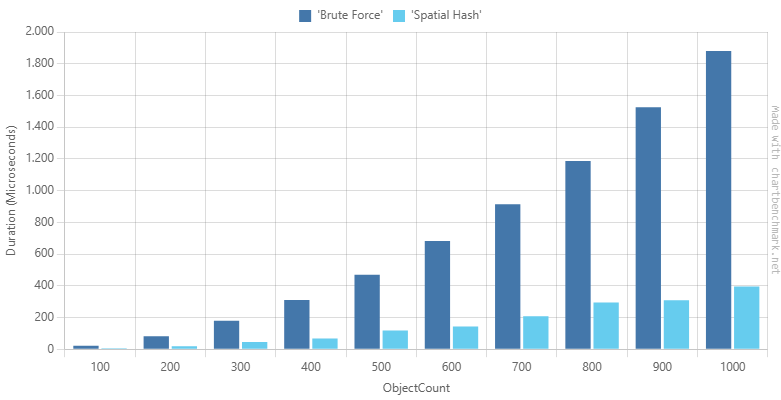
Brute Force vs Spatial Hash Grid Duration, 100 to 1000 Objects
From n=100 to n=1000 (10x more objects), the spatial hash time grows from ~5.7 µs to ~395 µs which is a ~69x increase for a 10x larger input. The brute force approach grows ~84x. At n=100, the spatial hash is 4x faster than the brute force approach, at n=1000 it’s ~4.7x faster.
While the spatial hash approach is still faster for larger input sizes, its advantage seems to be plateauing.
In my game, I’m expecting the number of game objects being simultaneously on the screen to be around between 100 and 200 tops. So, the spatial hash approach should be sufficient for my needs.
Other Optimization Approaches
The uniform grid is probably the easiest spatial partitioning technique to implement, but it has some limitations. There are other, more sophisticated techniques like Quadtree , or k-d trees .
Conclusion
We looked at two different collision detection approaches and compared their performance. The spatial hash approach seems a good choice for my game where I expect a moderate number of objects (100 to 200 max). However, for very large number of objects, other techniques might be more suitable.
Resources
- https://en.wikipedia.org/wiki/Minimum_bounding_box#Axis-aligned_minimum_bounding_box
- https://en.wikipedia.org/wiki/Space_partitioning
- https://en.wikipedia.org/wiki/Grid_(spatial_index)
- https://github.com/dotnet/BenchmarkDotNet
- https://chartbenchmark.net/
- https://en.wikipedia.org/wiki/Quadtree
- https://en.wikipedia.org/wiki/K-d_tree