In the last two articles of this series we looked at how the A* search algorithm can be applied to a simple top-down
scenario. Now let’s finally look at what needs to change for a side-view platformer game. We will implement an example
application in MonoGame
/ KNI
. For this, we will update the code from the
last post
.
Note
You don’t have to manually copy code snippets around. The complete project is available on GitHub
.
What Seems to Be the Problem with Side-View?
First of all, in a typical side-view platformer scenario, gravity is involved, pulling every game object down to
the ground. This means that, unlike in a top-down view, a character can’t just keep going up cells until they reach
the ceiling. (Unless the character has the ability to fly, of course. But we’re limiting ourselves to humanoid bipeds
without wings, or a jetpack, or a magic potion that defies gravity.) The only way to move upwards would be to jump or
to climb a ladder. Another limitation is that the character needs ground under their feet to walk sideways.
In summary the following can be said:
There is gravity involved, which limits how a character can move.
The character may or may not have certain capabilities such as walking, jumping, climbing ladders and using hanging bars.
Certain cell types can help the character to overcome specific restrictions, such as
ladders and hanging bars with which the character can defy gravity.
Cell Types and Capabilities
We’ll start with the cell types. Before, in the top-down world, we only had two types of cells: free and blocked. Now,
in our little side-view world, we have the following four cell types: empty, blocked, ladder and hanging bar.
Here’s an example of what this might look like:
An example of a side-view game world
Here are the properties of the different cell types:
An empty cell can obviously be occupied by the game character
A block, on the other hand, cannot. The character cannot pass through it.
A ladder can be used to climb up or down
Hanging bars can be used to move sideways
Let’s further assume that the character has the following capabilities:
Walk sideways
Climb ladders up and down and maybe even sideways
Swing along hanging bars
Jump sideways
Furthermore, certain capabilities could be switched on and off. For example, the character might not be able to jump at the
beginning. This ability could be unlocked later, e.g. through a power-up.
Walking, Climbing, Swinging (and Falling)
Let’s take a closer look on how we can move without jumping and what that means in terms of neighborhood:
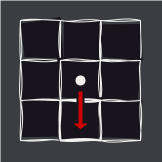
When the cell below is empty, then gravity takes over and the character is pulled down to the ground, which can be interpreted as ’the character can go down a cell if that cell is empty'.
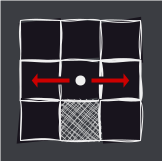
When there is ground below and the laterally adjoining cell is free, a ladder or a hanging bar, the character can walk in that direction.
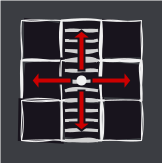
When the character is on a ladder, they can walk up and down and can also walk to the side, if the respective side is empty (or also a ladder or a hanging bar).
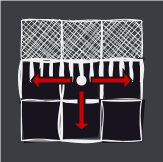
When the character has grabbed the hanging bars, they can move sideways or they can let loose and fall down.
Integrating Jumps
Note
Jumping can be implemented very differently in terms of height, distance, speed, etc. This results in individual jump
paths depending on the specific implementation. In addition, jumps of different heights and distances or even double jumps could also be possible.
The goal of this article is to explain the basic principle in a simple way, so we’ll keep things as straightforward as possible.
It’s even possible that, based on the colliders you’ve implemented, the trajectory we’ve used here, which is a bit
idealized, doesn’t allow a jump at all because the character bounces off the edge of a block, for example. We will
generously ignore this here and leave it to the reader to find a jump trajectory that works for their use case.
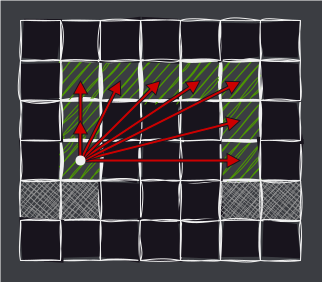
To simplify things a bit, let’s limit the jump capability to the following: the character can jump two cells high and
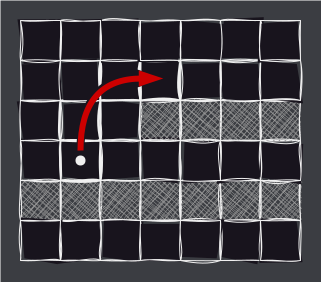
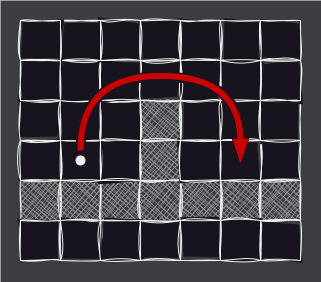
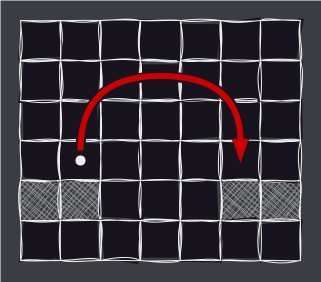
three cells to the side. Here are three example obstacles the character can overcome by jumping:
Jump onto a platform that’s no more than two cells higher.
Jump over a wall that’s no more than two cells high.
Jump over a pit that’s no more than three cells wide.
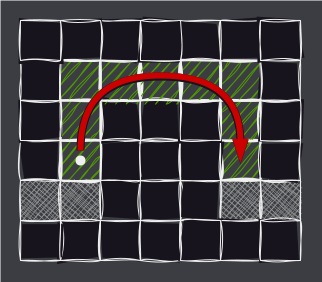
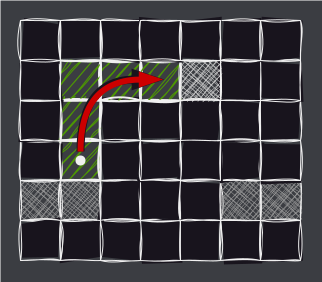
Looking at the example of a jump over a pit, we can see how the neighboring cells and the costs of reaching them are determined.
Each cell the jump trajectory is going through …
… is considered a neighboring cell which is reachable.
The cost is calculated by applying the accumulated manhattan distance.
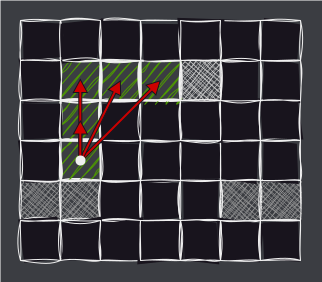
If there is a block in the jump trajectory, the jump ends there:
As you can see the number of neighbors is less compared to a “full” jump.
Let’s Code!
Now that we have an idea of how the concept of neighboring cells needs to change, we can cast that in code.
Updating the Cell Class
First of all, the Cell class from the last post needs another update. Instead of the walkabilty flag we now
need a cell type which will be implemented with an enum:
We added a public property Type for getting and also setting the cell type. Setting of a cell type is going to happen
via the level editor. When the cell type changes, we invoke a CellTypeChanged event.
In addition we added a few convenience properties for easily checking if the cell is empty or a block and so on.
Now, let’s take another look at the example diagrams above. You will notice that compared to the simpler top-down case
it is no longer sufficient to just look at the cells that are direct neighbors of the current cell. We need a way to
traverse through the grid from a specific cell so we’re able to look at a neighbor’s neighbor and then at the neighbor
of the neighbor’s neighbor and so on.
Instead of fiddling with the grid in the find-neighbor-logic, we will extend the Cell class even further and
add some properties that let us go easily into a certain direction from that cell. The fiddling will then be
done and hidden in these properties. For this, the Cell needs to be aware of the Grid it is part of.
As you can see we added a Grid parameter to the primary constructor. Then, there are a handful of properties for going up,
down, left, right, etc. from the cell and get the adjoining cell, if there is one, in the respective direction. If we
leave the grid, null is returned.
Updating the Grid Class
The Grid class also needs an update. Here is the class boiled down to the changes needed to add support for the new
cell types:
publicclassGrid{// ...privatereadonlyCell[,]_cells;publiceventAction?GridChanged;publicGrid(char[,]map){if(map.Length==0){thrownewArgumentException($"{nameof(map)} must contain at least 1 element");}_cells=newCell[map.GetLength(1),map.GetLength(0)];for(vary=0;y<map.GetLength(0);y++){for(varx=0;x<map.GetLength(1);x++){_cells[x,y]=newCell(x,y,CellTypeFromChar(map[y,x]),this);_cells[x,y].CellTypeChanged+=()=>GridChanged?.Invoke();}}}privatestaticCellTypeCellTypeFromChar(charc){returncswitch{' '=>CellType.Empty,'B'=>CellType.Block,'L'=>CellType.Ladder,'H'=>CellType.HangingBar,_=>thrownewArgumentException($"Invalid cell type: {c}")};}// ...}
First of all we got rid of the static constructor CreateFromArray and instead made the constructor public.
You’ll also see that the map array now contains chars instead of ints, and we need to map certain characters to
certain cell types, which is implemented in CellTypeFromChar. This allows us to instantiate the example grid like so:
Now that we have that out of the way, we can update the logic that finds neighbor cells. Because the find-neighbors code
will be a bit more complicated compared to the top-down case, it seems a good idea to put this into its own class. Also,
let’s define an interface, because why not (actually, that let’s you easily implement different neighbor finders and
also makes unit testing easier, because you can mock the neighbor finder interface):
A method FindNeighbors which takes the current cell, whether the game character has jump capability, and a
delegate with which the distance between two cells can be calculated (which in our case will be the good old
manhattan distance).
A delegate called GetDistanceDelegate which takes two cells and returns the distance in between.
You’ll have noticed that FindNeighbors returns an IEnumerable<CellCostPair>. Why not return Cells? Because now,
that we’re not only looking at adjoining cells but also at neighbors of neighbors, it seems sensible to calculate the
cost to reach a certain neighboring cell right when we’re looking at them, especially in the jumping context.
Thus, we create a simple DTO
which contains a cell and the cost to reach that cell:
Let’s continue with implementing the FindNeighbors method. This task can be split up into
finding neighboring cells reachable with and without jumping.
Cells Reachable without Jumping
Here is how to find cells that are reachable without jumping:
A nice thing we can do now is instead of fiddling with grid coordinates, we just use speaking property names like
cell.Down, which we can also combine with property patterns
to check if certain conditions are met.
The first bit deals with going down one cell. If the cell below isn’t a block then we can descend:
The next part handles whether we can go up one cell. If the current cell is a ladder (i.e. we’re standing on a ladder)
and there is no block in the cell above, then we can ascend:
The final sections focus on moving sideways. Here’s how we can determine whether the character can move to the right:
If the cell below isn’t empty, we’re on a ladder, or we’re hanging from bars, then we’re able to move sideways.
However, if the aforementioned condition isn’t met, then we can stop evaluating more neighbors.
What’s happening here? First of all, we define the jump trajectories in form of deltas from the source cell,
one for a jump to the right and another one for a jump to the left. Looking at the trajectory definitions
we see that applying these deltas to the start cell of a jump will unfold the jump path from earlier:
Next, in the FindNeighbors method we check if the character has jumping capability as well as if the cell below is a
block. If that’s not the case, then jumping is impossible and we stop:
Basically, it’s nothing more than a loop over the trajectory deltas, adding each delta to the source cell, checking to
see if it’s a cell at all, and if it is, if it’s not a block either, accumulating the cost to reach each respective cell,
and yield-returning each cell and the cost. And that’s pretty much it.
As you can already imagine, jumping to the left is the same as jumping to the right, just with a different set of trajectory deltas.
Updating the Rest
We also need to update the pathfinding code a bit so we can use the new neighbor finder class. Here’s the updated code:
In addition to the Grid object we pass an instance of INeighborFinder to the primary constructor. So far so good.
The next thing that should not go unnoticed is that the method FindPathCoroutine now, besides receiving a boolean parameter
for whether jumping is enabled, returns an instance of the
IEnumerator interface
.
But, if you take a look at the yield return statements, you will see that only null is returned. So what is this?
This is what might be called a coroutine
, which is a component whose execution
can be suspended and resumed later. As you may recall, the previous version of this method performed a single step of
the algorithm and then returned a boolean to indicate whether the algorithm had finished. The version presented here
does something similar, but instead of returning after a single step, it yields null, suspends execution, and then returns
control to the consumer of the enumerator.
Here’s how this thing is used, boiled down to just using the AStarPathfinder:
which returns an IEnumerator over which we can iterate a single step by calling
_findPathCoroutine.MoveNext()
which in turn returns true if the enumerator could be moved to the next element or false when we reached the end.
Interactive Example
At last, here’s the interactive example you’ve been waiting for:
Click to load app
This example lets you step through the algorithm step by step or watch it do its work. You can also manipulate
the grid by changing the cell types.
Compared to the other interactive example from one of the top-down posts, there’s an additional toggle switch which let’s you
control whether the character has jump capability. Here are the buttons explained:
Play/Stop: When first clicked, the algorithm will automatically run at a relatively slow pace so you can watch it in all its beauty; when clicked again, it will stop.
Step: Click to execute a single step of the algorithm.
Reset: Click to reset the algorithm.
Show/Hide Parent: When switched on, shows the relationship of the cells to their parent cells.
Toggle Jumping: When switched on, jumping is enabled.
Furthermore, you can edit the game world. By clicking one cell you can cycle through the different cell types. If you
click and hold, you can “paint” the world with the new cell type. Plus, you can drag the start (A) and target (B) cells
around.
When the algorithm is running, the cells change color:
Red: This is the cell currently being examined.
Orange: These cells are in the openSet and are about to be examined.
Yellow: These cells have their parent cell set.
Green: These cells are part of the path from A to B.
Additionally, cells that are being checked by the algorithm display two numbers. The first number in the upper left
corner displays the cost from the start cell to this cell. The second number below shows the estimated cost from the start to the
destination via that cell.
Example:The cost from the start to this cell
is 2, and the estimated cost from the start to the target via this cell is 14.
Conclusion
In a nutshell, making the switch from a top-down approach to a side-view platformer brings a few challenges,
because of the involvement of gravity and the limited movement options. Characters can’t just go up and down in
the same way they would in a top-down scenario. Instead, they use ladders, hanging bars, and jumping to overcome obstacles in
the game world. We looked at how we could tweak the A* pathfinding algorithm and the neighbor-finding logic in particular
to make it work with these constraints.