Framework-Independent Game Logic with Hexagonal Architecture
Table of Contents
Introduction
Usually, when making a game, there are lots of great frameworks out there that help you get off the ground quickly. We don’t want to reinvent the wheel every time we make a game, right? Frameworks usually do all the “dirty” low-level heavy lifting for us, so we can focus on the game logic and the fun stuff. And that’s fine!
However, when using a framework, the game logic often gets tightly coupled to it. This isn’t necessarily a bad thing, but it can make it difficult to write tests for the game logic. Another downside is that it can be quite difficult to switch to another framework later on, should we wish to do so.
So, how can we make a game that is easy to test and that is not tightly coupled to a specific framework? In this blog post, we’re going to take a look at hexagonal architecture and how we can use it to make the game logic framework-independent. As an example, we’ll implement a video game that simulates table tennis with weird gravity. Yes, yes, it’s not going to be a super elaborated example, but it should be enough to illustrate the concept. We’re going to use Kni for that, a MonoGame derivative with WebGL support.
Dependencies and Coupling
First of all, what is a dependency and what is meant by coupling? In easy terms, a dependency is when one module uses some other module. A module can be a class, for example. Dependencies also have a direction. If module A uses module B, then module A depends on module B. Hence, it is coupled to module B. Coupling is the degree to which module A is dependent on module B.
Dependencies aren’t bad, per se. In fact, we need them to build software. The challenge is to get our dependencies “right” and the coupling “loose”.
When making a new game (or any piece of software, really) using a framework, it is very easy to couple the game logic to the framework. The game logic becomes dependent on the framework, it can’t “work on its own” anymore.
Example
Here’s an example I stumbled upon during my own endeavours.
Let’s say we’re writing a game that uses MonoGame. Let’s further assume we’re writing a class for some game object,
like a paddle. One thing we surely need is a sprite to draw the paddle on the screen. Let’s inject one in form of a Texture2D
object to the constructor.
And there we have it, we can’t just unit test this class anymore, because we need a Texture2D object to instantiate
an object of this class. And we can’t instantiate a Texture2D object without a GraphicsDevice object. And we can’t
instantiate a GraphicsDevice object without a GraphicsAdapter object. And so on and so forth.
Ok, let’s setter-inject the Texture2D object then and only set it when we need it. This allows us to instantiate an
object of this class without a Texture2D object, but we then have a nullable property in our class that we have to check
every time we want to use it to make sure it’s not null. Then, if it is null, what do we do? Is it an error? Should we
throw an exception? Should we ignore it? Should we use some kind of default Texture2D object? Then, where does that come from?
“But, I need the Texture2D object to draw that paddle on the screen!”, you might say. And you’re right. At some point,
somewhere, we’re going to need that Texture2D object. But do we need it in the game logic? It’s a framework specific
thing, not a game logic one, isn’t it?
Note
Don’t get me wrong, it’s not my intention to bash MonoGame. It’s a great framework and I like building things with it! 😻
Hexagonal Architecture
Quick Overview
Hexagonal Architecture , also known as Ports and Adapters, is an architectural pattern that helps to structure the software so that the core logic is at the center and is independent on any external things. Instead, the core logic defines so-called ports (e.g. interfaces) for interacting with the outside world. The outside world in turn implements adapters that serve as the glue between the core logic and the outside world.
There are two types of ports: driving and driven ports. The driving ports are used by the outside to call into the core logic, while the driven ports are used by the core to call out to the outside world. The outside world can be anything, like a database, a web service, or a game framework.
Note
If you want to learn more about Hexagonal Architecture, I recommend this talk on YouTube by the creator Alistair Cockburn himself.
Applying Hexagonal Architecture to Our Game
Now, let’s think of our little game, what ports do we probably need? What’s needed to run a game? At the heart of every game is something which is called the game loop - Quote:
A game loop runs continuously during gameplay. Each turn of the loop, it processes user input without blocking, updates the game state, and renders the game. It tracks the passage of time to control the rate of gameplay.
So, we’ll need at least one driving port for the game logic to be called from the outside. Next, we’ll need driven ports for reading input, rendering, and playing sounds. The following diagram illustrates this:

Hexagonal Architecture
That means we have four interfaces that are defined in the game logic (not the other way around).
The Driving Port
Let’s start with the driving port. For that, we’ll define an interface and give it a talking name: IForRunningTheGame.
Because it is a driving port, the interface will also be implemented in the game logic.
Thus, the interface is going to have methods for the outside world to call into our game logic, e.g. Update and Draw:
Note
You can find the full source code of the game on GitHub .
using Clong.Core.Domain.Dto;

namespace Clong.Core.Ports.Driving;

public interface IForRunningTheGame
{
    public void Update(GameTime gameTime);
    public void Draw();
}
The implementation looks like this:
using Clong.Core.Domain.Dto;
using Clong.Core.Ports.Driving;

namespace Clong.Core.Domain;

public class Clong( /* ... */ ) : IForRunningTheGame
{
    public void Update(GameTime gameTime)
    {
        // 1. Read input [*]
        // 2. Update game state
        // 3. Play sounds [*]
    }

    public void Draw()
    {
        // 1. Render game objects [*]
    }

    // [*] Hint: There're driven ports for these!
}
You’ll notice that the Update method takes a GameTime object as an argument. It’s important to note that this isn’t
the MonoGame GameTime object, but a custom one that we define in the game logic. We don’t want to depend on any classes
defined by the framework. Here’s our definition of GameTime:
namespace Clong.Core.Domain.Dto;

public class GameTime
{
    public required TimeSpan DeltaTime { internal get; init; }
    public required TimeSpan TotalTime { internal get; init; }
    internal float TotalSeconds => (float)TotalTime.TotalSeconds;
    internal float DeltaSeconds => (float)DeltaTime.TotalSeconds;
}
As you can image, we’ll need something on the framework side that translates the framework’s GameTime object to our own, and
then calls our Update method with it. That sounds like an adapter:
using Clong.Core.Ports.Driving;
using Microsoft.Xna.Framework;
using DomainGameTime = Clong.Core.Domain.Dto.GameTime;

namespace Clong.Kni.Adapter.Driving;

public class GameController(IForRunningTheGame game)
{
    public void Update(GameTime gameTime)
    {
        game.Update(
            new DomainGameTime {
                DeltaTime = gameTime.ElapsedGameTime,
                TotalTime = gameTime.TotalGameTime
            }
        );
    }

    public void Draw()
    {
        game.Draw();
    }
}
The call to Draw is simply delegated to the game logic without any arguments.
“But, where’s the SpriteBatch?”, you might ask. We’ll come to that in a second.
The Driven Ports
On the driven side we need interfaces for reading input, rendering, and playing sounds. These interfaces are implemented in the adapter component.
Reading Input
Let’s start with the input:
using Clong.Core.Domain.Input;

namespace Clong.Core.Ports.Driven;

public interface IForReadingInput
{
    public InputState ReadInput();
}
The InputState object is a simple DTO that holds the state of the input devices, like pressed keys on the keyboard:
using Clong.Core.Domain.Enum;

namespace Clong.Core.Domain.Input;

public class InputState
{
    public required Key[] PressedKeys { get; init; }
    public required Key[] PreviouslyPressedKeys { get; init; }
    internal bool IsKeyDown(Key key) => PressedKeys.Contains(key);
    internal bool WasKeyPressedInThisFrame(Key key) => PressedKeys.Contains(key) && !PreviouslyPressedKeys.Contains(key);
}
So, what’s this Key class? It’s an enum that defines the keys, which is basically a copy of the Keys enum from MonoGame:
namespace Clong.Core.Domain.Enum;

public enum Key
{
    // ...

    Left = 37,
    Up = 38,
    Right = 39,
    Down = 40,

    // ...
}
Yes, it’s bit “ugly” that we have to define our own Key enum, but again, it’s necessary and a price we have to pay to
decouple the game logic from the framework.
Let’s look at the implementation of the IForReadingInput interface:
using Clong.Core.Domain.Input;
using Clong.Core.Ports.Driven;
using Microsoft.Xna.Framework.Input;
using DomainKey = Clong.Core.Domain.Enum.Key;
using MonoGameKey = Microsoft.Xna.Framework.Input.Keys;

namespace Clong.Kni.Adapter.Driven.Input;

public class InputReader : IForReadingInput
{
    private static readonly KeyMap KeyMap = new();
    private DomainKey[] _pressedDomainKeys = [];
    private DomainKey[] _previouslyPressedDomainKeys = [];

    public InputState ReadInput()
    {
        var pressedMonoGameKeys = Keyboard.GetState().GetPressedKeys();

        _previouslyPressedDomainKeys = _pressedDomainKeys;
        _pressedDomainKeys = MapToDomainKeys(pressedMonoGameKeys);

        return new InputState {
            PressedKeys = _pressedDomainKeys,
            PreviouslyPressedKeys = _previouslyPressedDomainKeys
        };
    }

    private static DomainKey[] MapToDomainKeys(MonoGameKey[] keys)
    {
        var pressedDomainKeys = new DomainKey[keys.Length];
        for (var i = 0; i < keys.Length; i++) {
            pressedDomainKeys[i] = KeyMap[keys[i]];
        }

        return pressedDomainKeys;
    }
}
Yes, even a bit more “ugly”, we need a KeyMap to map the MonoGame keys to our own keys:
using DomainKey = Clong.Core.Domain.Enum.Key;
using MonoGameKey = Microsoft.Xna.Framework.Input.Keys;

namespace Clong.Kni.Adapter.Driven.Input;

public class KeyMap
{
    public DomainKey this[MonoGameKey monoGameKey] => Map[monoGameKey];

    private static readonly Dictionary<MonoGameKey, DomainKey> Map = new() {
        // ...

        { MonoGameKey.Left, DomainKey.Left },
        { MonoGameKey.Up, DomainKey.Up },
        { MonoGameKey.Right, DomainKey.Right },
        { MonoGameKey.Down, DomainKey.Down },

        // ...
    };
}
Rendering
Next, the game logic needs a way to render the game objects. For that, we define the IForRendering interface:
using System.Numerics;
using Clong.Core.Domain.Enum;

namespace Clong.Core.Ports.Driven;

public interface IForRendering
{
    public void DrawTexture(TextureId texture, Vector2 position);

    // ...
}
Let’s have a look at the DrawTexture method. It takes a TextureId enum and a Vector2 object
(a System.Numerics one, not a MonoGame one) as arguments. The TextureId enum defines all the different textures
used in the game and is later used to identify which Texture2D to draw.
(We’re also going to need to draw some text, but I leave that out for brevity - this blog post is already getting a bit long 🙂).
namespace Clong.Core.Domain.Enum;

public enum TextureId
{
    Ball,
    PaddleL,
    PaddleR,
    Star
}
The IForRendering interface is implemented in the adapter component:
using Clong.Core.Domain.Enum;
using Clong.Core.Ports.Driven;
using Microsoft.Xna.Framework;
using Microsoft.Xna.Framework.Graphics;
using Vector2 = Microsoft.Xna.Framework.Vector2;

namespace Clong.Kni.Adapter.Driven.Rendering;

public class Renderer(SpriteBatch spriteBatch, TextureMap textureMap /* ... */ ) : IForRendering
{
    public void DrawTexture(TextureId texture, System.Numerics.Vector2 position)
    {
        var texture2D = textureMap[texture];

        spriteBatch.Draw(
            texture2D,
            new Vector2(position.X, position.Y),
            null,
            Color.White,
            0,
            new Vector2(texture2D.Width / 2f, texture2D.Height / 2f),
            Vector2.One,
            SpriteEffects.None,
            0f
        );
    }

    // ...
}
The implementation depends on a SpriteBatch object (there you go), and a TextureMap object.
The TextureMap object is a simple dictionary that maps the TextureId enum to the Texture2D objects:
using Clong.Core.Domain.Enum;
using Microsoft.Xna.Framework.Graphics;

namespace Clong.Kni.Adapter.Driven.Rendering;

public class TextureMap
{
    private readonly Dictionary<TextureId, Texture2D> _textures = new();

    public Texture2D this[TextureId t] {
        get => _textures[t];
        init => _textures[t] = value;
    }
}
So, in the adapter world we have something along the lines of:
namespace Clong.Kni.Adapter;

public class MainGame : Game
{
    // ...

    protected override void LoadContent()
    {
        var textureMap = new TextureMap {
            [TextureId.Ball] = Content.Load<Texture2D>("Textures/ball"),
            [TextureId.PaddleL] = Content.Load<Texture2D>("Textures/paddle1"),
            [TextureId.PaddleR] = Content.Load<Texture2D>("Textures/paddle2"),
            [TextureId.Star] = Content.Load<Texture2D>("Textures/star")
        };

        // ...
    }

    // ...
 }
Playing Sounds
Finally, we need a way to play sounds. For that, we define the IForPlayingSounds interface:
using Clong.Core.Domain.Enum;

namespace Clong.Core.Ports.Driven;

public interface IForPlayingSound
{
    public void PlaySound(SoundId soundId);
}
The SoundId enum is similar to the TextureId enum and defines all the different sounds used in the game logic:
using Clong.Core.Domain.Enum;
using Microsoft.Xna.Framework.Audio;

namespace Clong.Kni.Adapter.Driven.Sound;

public class SoundMap
{
    private readonly Dictionary<SoundId, SoundEffect> _sounds = new();

    public SoundEffect this[SoundId t] {
        get => _sounds[t];
        init => _sounds[t] = value;
    }
}
The implementation of the interface is also quite simple:
using Clong.Core.Domain.Enum;
using Clong.Core.Ports.Driven;

namespace Clong.Kni.Adapter.Driven.Sound;

public class SoundEffectPlayer(SoundMap soundMap) : IForPlayingSound
{
    public void PlaySound(SoundId soundId)
    {
        var soundEffect = soundMap[soundId];
        soundEffect.Play();
    }
}
So much for the ports. Let’s step back a bit and take a look at the two control flows:
Control Flows

Control Flow for Update

Control Flow for Draw
Both control flows start in the adapter component. The GameController object calls the Update method on the game logic.
The game logic then reads the input, updates the game state, and plays sounds.
The Draw method is called in a similar way. The game logic renders the game objects, which are then drawn by the Renderer object.
Let’s Fill In the Gaps in the Game Logic
Our game logic class Clong needs to know about the driven ports. We’ll inject them into the constructor. Also, let’s
add a paddle to illustrate how things are coming together:
using Clong.Core.Domain.Dto;
using Clong.Core.Ports.Driven;
using Clong.Core.Ports.Driving;

namespace Clong.Core.Domain;

public class Clong(
    IForReadingInput inputReader,
    IForRendering renderer,
    IForPlayingSound soundPlayer
) : IForRunningTheGame
{
    private readonly Paddle _paddleL = new() {
        Position = new Vector2(8, Resolution.DesignHeight / 2f),
        Texture = TextureId.PaddleL
    };

    public void Update(GameTime gameTime)
    {
        var inputState = inputReader.ReadInput();

        var playerLInput = InGameControlInput.FromInputState(inputState, _inputConfigurationPlayerL);

        _paddleL.Update(gameTime, playerLInput);
        CheckIfBallHitPaddle(_paddleL);
    }

    public void Draw()
    {
        _paddleL.Draw(renderer);
    }

    private void CheckIfBallHitPaddle(Paddle hitPaddle)
    {
        // Some logic to check if the ball hit the paddle
        // ...

        soundPlayer.PlaySound(SoundId.BallHitPaddle);
    }
}
And here’s the Paddle class:
using System.Numerics;
using Clong.Core.Domain.Dto;
using Clong.Core.Domain.Enum;
using Clong.Core.Domain.Input;
using Clong.Core.Ports.Driven;

namespace Clong.Core.Domain.Entity;

internal class Paddle
{
    private const float Speed = 500f;

    public required TextureId Texture { get; init; }
    public Vector2 Position { get; set; }

    public void Update(GameTime gameTime, InGameControlInput input)
    {
        var newPositionY = Position.Y + gameTime.DeltaSeconds * Speed * input.Y;
    }

    public void Draw(IForRendering renderer)
    {
        renderer.DrawTexture(Texture, Position);
    }
}
And the InGameControlInput class that converts pressed keys to control input for the paddle:
namespace Clong.Core.Domain.Input;

internal class InGameControlInput
{
    internal required float Y { get; init; }

    internal static InGameControlInput FromInputState(InputState inputState, InputConfiguration configuration)
    {
        var up = inputState.IsKeyDown(configuration.KeyUp);
        var down = inputState.IsKeyDown(configuration.KeyDown);

        var controlInputY = 0f;
        if (up) {
            controlInputY += -1f;
        }
        if (down) {
            controlInputY += 1f;
        }

        return new InGameControlInput { Y = controlInputY };
    }
}
We’ll leave the InputConfiguration class out here. Its purpose is to map physical keys to logical keys, and can be
used by the player to configure their own key mapping.
The Clong class is instantiated in the adapter component:
namespace Clong.Kni.Adapter;

public class MainGame : Game
{
    // ...

    protected override void LoadContent()
    {
        var textureMap = new TextureMap {
            [TextureId.Ball] = Content.Load<Texture2D>("Textures/ball"),
            [TextureId.PaddleL] = Content.Load<Texture2D>("Textures/paddle1"),
            [TextureId.PaddleR] = Content.Load<Texture2D>("Textures/paddle2"),
            [TextureId.Star] = Content.Load<Texture2D>("Textures/star")
        };

        // ...
    }

    // ...

    _gameController = new GameController(
        new Core.Domain.Clong(
            new InputReader(),
            new Renderer(_spriteBatch, textureMap, font),
            new SoundEffectPlayer(soundMap)
        )
    );
 }
And that’s basically it! Now, let’s look at how we can add a unit test.
Add a Unit Test
Let’s add a quick unit test for the paddle that tests if the control input actually moves the paddle:
[TestFixture]
[TestOf(typeof(Paddle))]
public class PaddleTest
{
    [Test]
    public void TestUpdateMovesPaddle()
    {
        var paddle = new Paddle {
            Texture = TextureId.PaddleL,
            Position = new Vector2(0, 100)
        };

        const float epsilon = 0.001f;
        var gameTimeBuilder = new GameTimeBuilder();

        var gameTime = gameTimeBuilder.Build();
        var controlInput = new InGameControlInput { Y = 1 };
        paddle.Update(gameTime, controlInput);
        Assert.That(paddle.Position.X, Is.EqualTo(0));
        Assert.That(paddle.Position.Y, Is.EqualTo(108.333f).Within(epsilon));

        gameTime = gameTimeBuilder.AdvanceFrame().Build();
        paddle.Update(gameTime, controlInput);
        Assert.That(paddle.Position.X, Is.EqualTo(0));
        Assert.That(paddle.Position.Y, Is.EqualTo(116.666f).Within(epsilon));

        gameTime = gameTimeBuilder.AdvanceFrame().Build();
        controlInput = new InGameControlInput { Y = -1 };
        paddle.Update(gameTime, controlInput);
        Assert.That(paddle.Position.X, Is.EqualTo(0));
        Assert.That(paddle.Position.Y, Is.EqualTo(108.333f).Within(epsilon));

        gameTime = gameTimeBuilder.AdvanceFrame().Build();
        paddle.Update(gameTime, controlInput);
        Assert.That(paddle.Position.X, Is.EqualTo(0));
        Assert.That(paddle.Position.Y, Is.EqualTo(100f).Within(epsilon));

        gameTime = gameTimeBuilder.AdvanceFrame().Build();
        controlInput = new InGameControlInput { Y = 0 };
        paddle.Update(gameTime, controlInput);
        Assert.That(paddle.Position.X, Is.EqualTo(0));
        Assert.That(paddle.Position.Y, Is.EqualTo(100f).Within(epsilon));
    }
}

public class GameTimeBuilder
{
    private readonly TimeSpan _deltaTime = TimeSpan.FromTicks(TimeSpan.TicksPerSecond / 60);
    private int _numberOfFrames = 1;

    public GameTimeBuilder AdvanceFrame()
    {
        _numberOfFrames++;
        return this;
    }

    public GameTime Build()
    {
        return new GameTime {
            DeltaTime = _deltaTime,
            TotalTime = _deltaTime * _numberOfFrames
        };
    }
}
Note
You can find the full source code of the game on GitHub .
Let’s Play!
Let’s have a look at the finished game. To make it a bit more interesting, we added a starfield as background and “rotating gravity” that makes the ball’s movement a bit wonky and unpredictable.
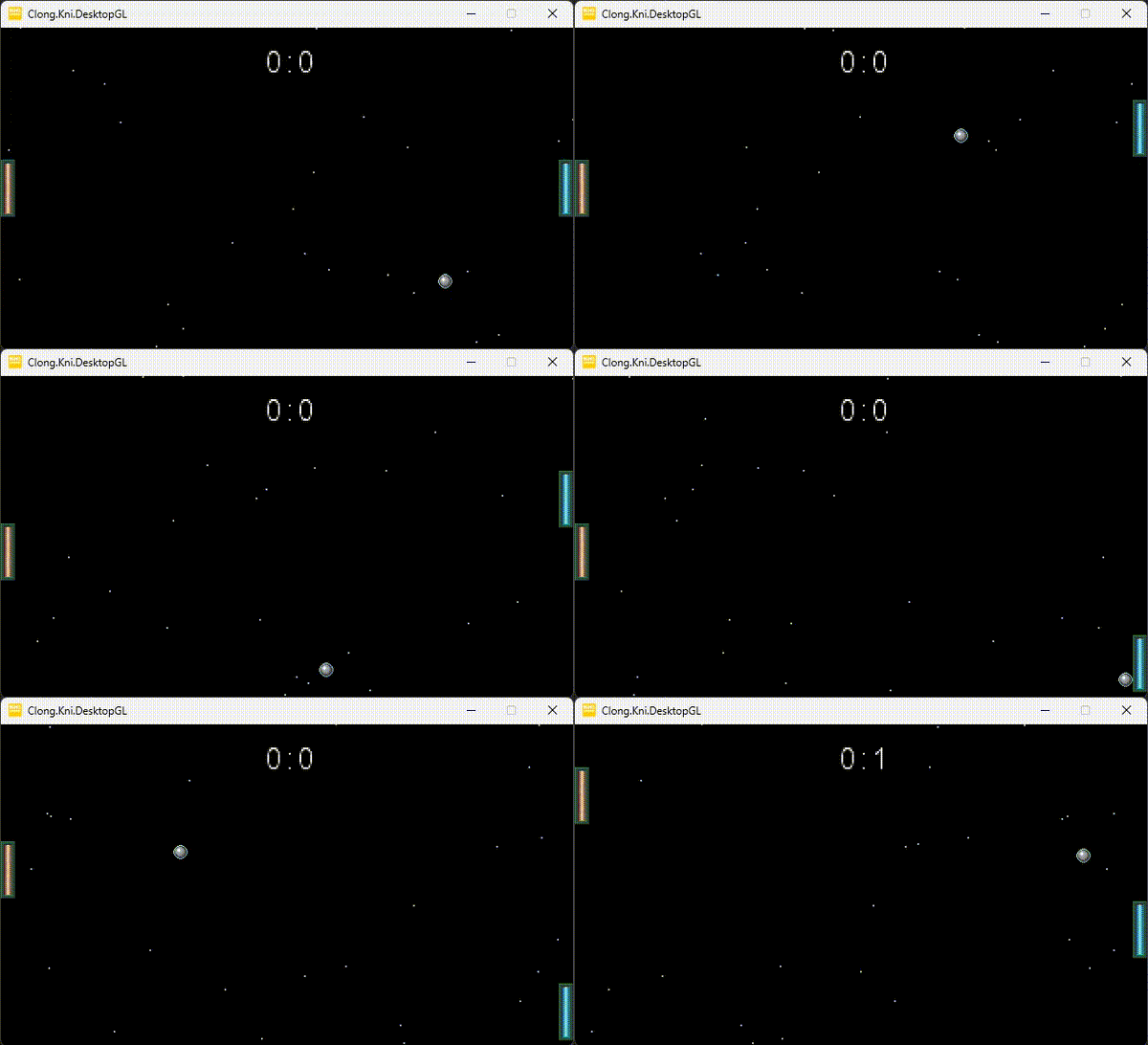
Clong in Action
(I'm afraid the game doesn't work on mobile devices yet, sorry! 😢)
Note
Alternatively, you can try the game out on itch.io
Conclusion
Using Hexagonal Architecture for game development is a possible way to separate game logic from the framework. This makes it easier to test, change, and maintain, but also might come at a performance cost. Also, while this approach may require some extra effort, like converting framework-specific elements to domain-specific ones, the advantage of clear separation make it worthwhile.