Fitness Tracker
Table of Contents
A full-stack app for tracking workouts. Spring Boot backend, Nuxt frontend.
TL;DR
Fitness Tracker is an application for tracking fitness activities by either uploading recorded gpx files or manually entering data. It offers a simple and intuitive user interface, which presents the user some statistics about their activities, as well as gamification in form of challenges and milestones the user can achieve. It consists of a Spring Boot backend and a Nuxt frontend, and makes use of hexagonal architecture in the backend for better maintainability and testability.
Fitness Tracker Login Screen
Key Features
Feature 1 – Activities
An activity is a record of a user’s fitness activity. It has a type (run, walk, swim, bike, etc.), a start and end time, a title, and an optional description. Users can upload activities via gpx files or manually enter data.
When uploading activities, the application automatically calculates statistics about the activity. The gpx data is stored as a timeline of points, which is then processed to calculate various metrics such as distance, elevation gain, and speed.
Users can list their activities and view details. If the activity was uploaded with a gpx file, details include a map of the activity, and time series charts showing the speed (or pace), and the elevation gain.
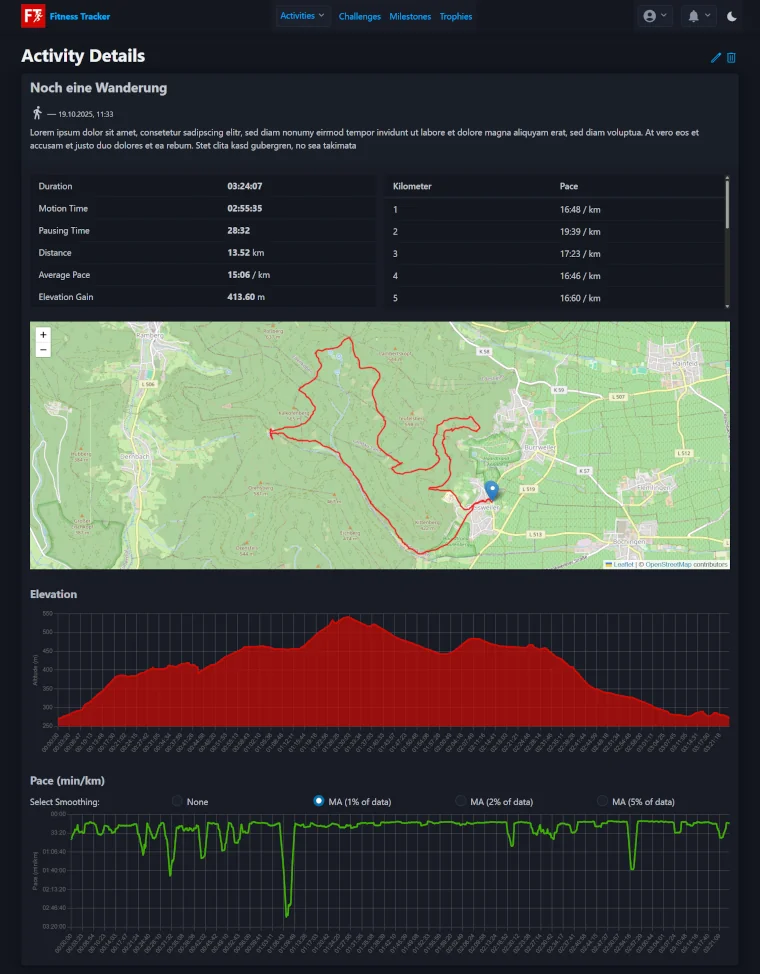
Fitness Tracker Activity Details Screen
Feature 2 – Achievements
An achievement can either be a milestone or a challenge. Milestones are achieved by completing a specific number of activities, whereas challenges are achieved by reaching a certain threshold for a specific activity metric. Challenges must be participated in in order to earn a badge. They have a start and end date, and can only be completed within that time frame. When an achievement is earned, the user is awarded a trophy. Upon adding, uploading, updating or deleting an activity, the application checks if the user has earned any new trophies, or if any of their already completed achievements have become incomplete.
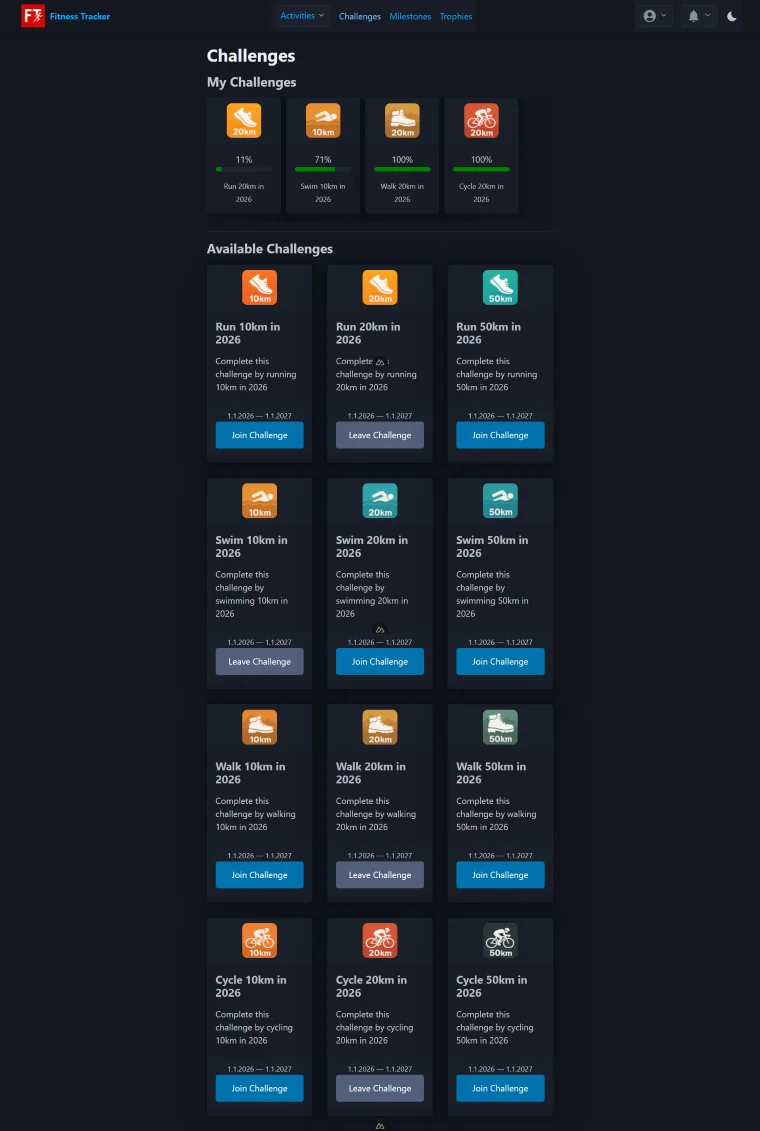
The challenges screen shows the challenges the user is participating in, how much progress they have made for each challenge, and a list of currently available challenges
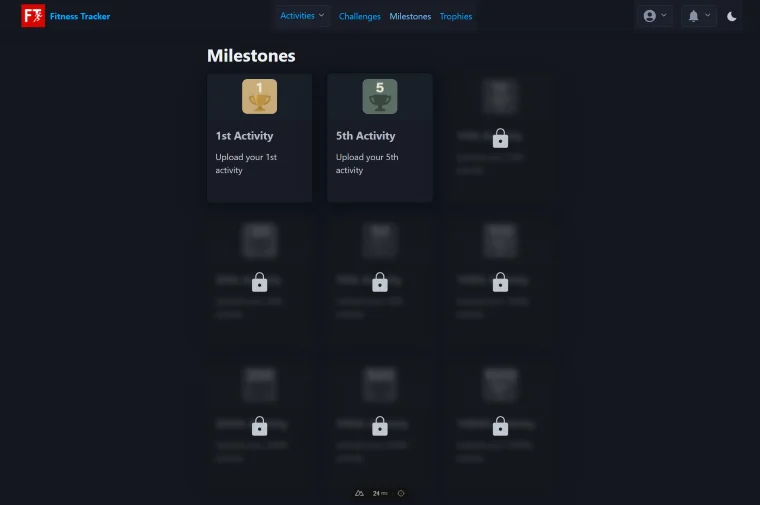
The milestones screen shows the milestones the user has completed, as well as a list of milestones (blurred) yet to be completed
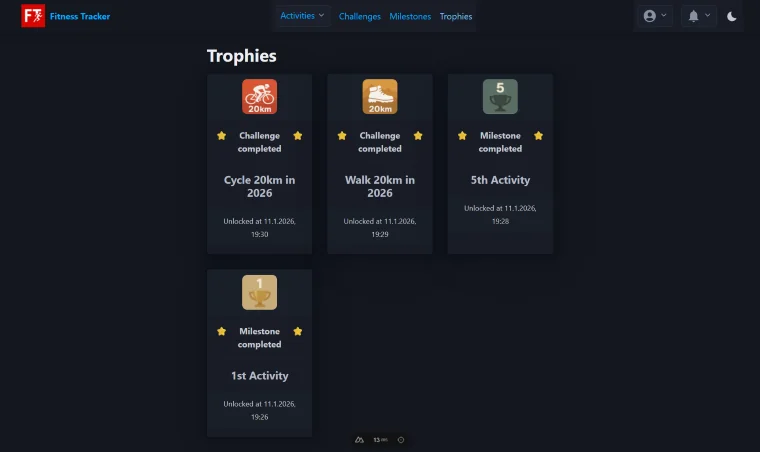
The trophies screen shows the trophies the user has earned
Motivation
The main motivation for this project was to learn more about hexagonal architecture, to practice my Java skills, and to learn Spring Boot. Using Symfony in my day job, Spring Boot seemed like a natural choice for this project. I also wanted to sharpen my frontend skills, and gave Nuxt a try.
Goals and Non-Goals
Goals
- Build an MVP for a fitness tracker with a handful of features
- Practice Java, learn Spring Boot and Nuxt
- Practice hexagonal architecture
- Practice frontend development
Non-Goals
- Build a production-ready application with tons of features
- Support for wearables or other devices
- Support for live tracking of fitness activities
- Social and community features
Tech Stack
Backend
- Language: Java 21
- Framework: Spring Boot 3.5 (including Security, Data JPA, and Validation)
- Libraries: Lombok, MapStruct, SpringDoc OpenAPI, Togglz, ULIDCreator, Auth0 Java JWT, JPX, JSON Logic Java
- Build Tool: Gradle
- Testing: JUnit 5, Mockito, ArchUnit, Jacoco, Spring Security Test
- Other Tools / Services: Docker, Docker Compose, H2 Database, GitHub Actions
Frontend
- Language: TypeScript, (S)CSS, HTML
- Frameworks: Nuxt 4, Vue 3
- Libraries: Pinia, VeeValidate, Zod, Pico.css, Sass, Lucide Icons, Chart.js, vue-chartjs, Leaflet, Notivue, nuxt-auth-utils, nuxt-security & nuxt-csurf
- Build Tool: Vite
- Testing: Vitest, Playwright, Vue Test Utils, Happy-dom
- Other Tools / Services: ESLint, npm, Docker, Docker Compose, GitHub Actions
Architecture Overview
This Fitness Tracker project is a full-stack application, primarily focusing on a decoupled frontend and a structured, domain-driven backend.
Main Building Blocks, Important Patterns & Design Decisions
The system is split into two major components: the frontend and the backend. The backend offers a REST API for interacting with the frontend.
Context Diagram with Frontend and Backend
Backend (Java 21 / Spring Boot 3.5)
The backend application uses the Ports and Adapters (a.k.a. Hexagonal) architecture. The core business logic (domain and application) is isolated behind interfaces (ports). Technology-specific details (HTTP, databases, etc.) live in adapters that “plug” into those ports. This keeps the business logic independent of infrastructure concerns and makes the system easier to test and evolve. Here’s a quick diagram:

Hexagonal Architecture in the Backend
Concepts in the Codebase
Domain (pure business)
- Entities, value objects, and domain services express the core model and rules
- Some main entities include:
Activity(e.g. a run or a hike)Challenge(e.g. run 20km in january)ChallengeParticipation(a user’s participation in a challenge)Milestone(e.g. the n-th uploaded activity)User(a user of the application)Trophy(a badge awarded for completing a challenge or milestone)Notification(a message for a user about an uploadeded activity, or a new challenge or milestone, etc.)- …
Application (use cases)
- Coordinates workflows and orchestrates ports
- Defines ports as Java interfaces
- Defines events and event listeners
Ports
- Incoming ports model what the application can do (use cases) from an external perspective, controllers call these.
Some main use cases include:
- Create, upload, update, and delete activities
- List activities, activity details, and activity stats
- Participate in challenges
- …
- Outgoing ports model what the application needs from the outside world (like loading/saving activities), adapters implement these to talk to infrastructure like a database
Adapters
- Inbound adapters call the application through incoming ports (e.g. REST controllers map Request DTOs to domain objects, invoke application services, and map domain objects back to Response DTOs)
- Outbound adapters implement outgoing ports to talk to external systems and map between domain objects and external representations (like JPA entities)
Infrastructure
- Cross-cutting technical concerns (e.g. config, security)
Basic folder structure:
/src/main/.../fitnesstrackerapi
├-- adapter
|   ├-- in
|   |   └-- rest
|   |       ├-- controller
|   |       ├-- dto
|   |       └-- mapper
|   └-- out
|       └-- jpa
|           ├-- entity
|           ├-- mapper
|           ├-- projection
|           └-- repository
├--- application
|    ├-- exception
|    ├-- port
|    |   ├-- in
|    |   └-- out
|    └-- service
├--- domain
|    ├-- entity
|    ├-- service
|    └-- value
└--- infrastructure
     ├-- config
     ├-- security
     └-- ...
Here’s a quick overview of the API endpoints:
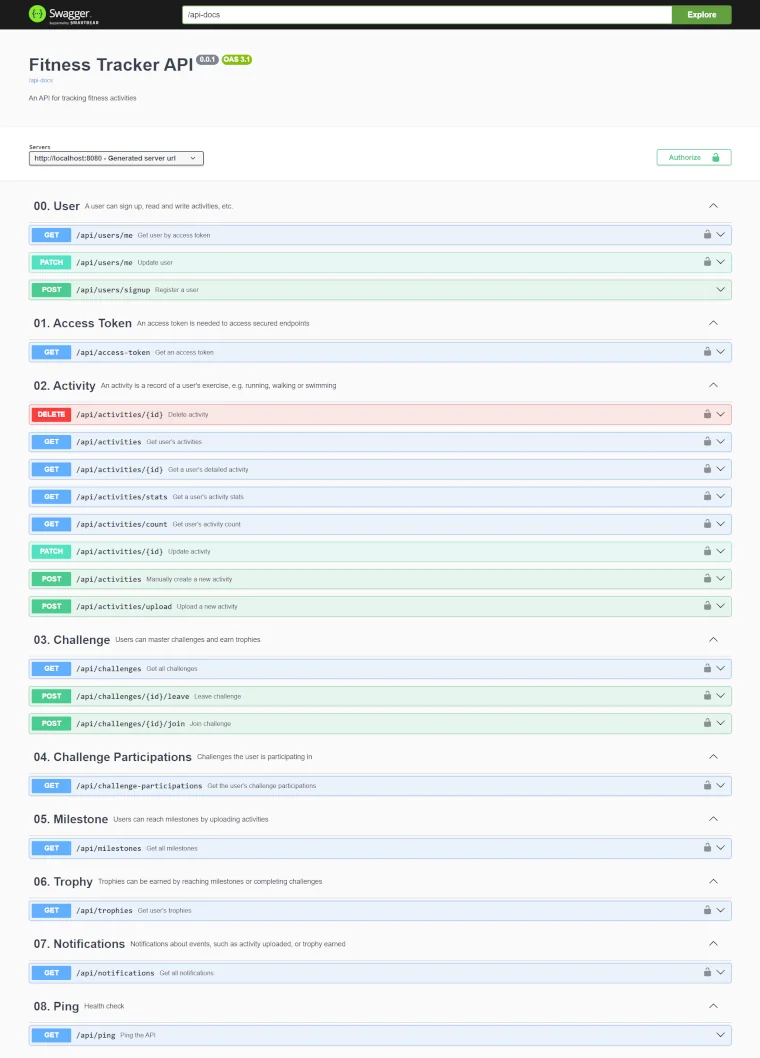
Fitness Tracker API Docs
Frontend (Nuxt 4 / Vue 3)
The frontend is a single-page application (SPA) which contains multiple layers:
- App Layer: Contains the core Vue components and pages.
- Server Layer: Leverages Nuxt’s Nitro engine for server-side logic, handling API proxying.
- Validation Layer: Uses VeeValidate and Zod for schema-based form validation.
Current State
Current status: experimental
Further Evolution
- Instead of having one hexagon in the backend, split into multiple hexagons, one per domain:
- Activity
- Gamification (e.g. challenges, milestones, trophies)
- Notification
- User
- Automate deployment via Github Action
- Add authentication via OAuth2